

BetArctica Casino Login
A personal account helps new visitors move from exploring the website to managing their own settings without unnecessary steps. At Bet Arctica Casino, registration begins with contact details, while signing in provides access to your balance, activity history, personal limits and identity verification information. This page explains how to complete the registration form, sign in securely from a mobile or computer, and recover your password when necessary.
What to Prepare Before Creating an Account
To register, you need a personal email address, a secure password and accurate personal information. At Bet Arctica Casino, it is important to enter your actual country of residence from the outset, as available features and subsequent verification requirements may depend on your region. BetArctica visitors from the United Kingdom should check whether their country is supported and select GBP if this currency is available in the registration form. Only adults who meet the platform's terms and conditions should create an account.
- Use a personal email address that you can access at all times.
- Check whether your country and preferred currency are supported before submitting the form.
- Store your password in a secure password manager rather than in publicly accessible notes.
| Feature | Information |
|---|---|
| Getting started | Sign Up button and personal account creation |
| Essential details | Email address and password; additional fields depend on the registration form |
| Logging in | Email address and password entered in the Login form |
| Alternative option | Sign up with Google button displayed in the interface |
| Account recovery | Forgot password? link |
| Account access | Through a desktop or mobile browser |
From Your First Click to a Fully Registered Account
When visiting Bet Arctica Casino for the first time, start by opening the registration window and carefully reviewing the field labels. The email address must belong to you, as it may be used to send confirmations and account recovery instructions. Create a password that differs from those used for your email or other services. If the form requests your name, date of birth, country or telephone number, enter the information exactly as it appears in your official documents.
- Open Sign Up and check which account creation methods are available on your version of the website.
- Enter your email address, create a strong password, complete the required personal information fields and check your selected currency.
- Read the terms and conditions, provide the necessary consent and submit the form. If you receive an email or verification code, follow the instructions provided.
- Return to the login window, sign in and check that your personal account information is correct.
A Familiar Login Form on Every Screen
The BetArctica Casino Login section is designed for users who have already completed registration. On a computer, open the BetArctica login page, enter your registered email address and password, then select Login. The icon beside the password field allows you to check the characters you have entered when necessary. Before signing in on someone else's device, make sure the browser will not automatically save your credentials.
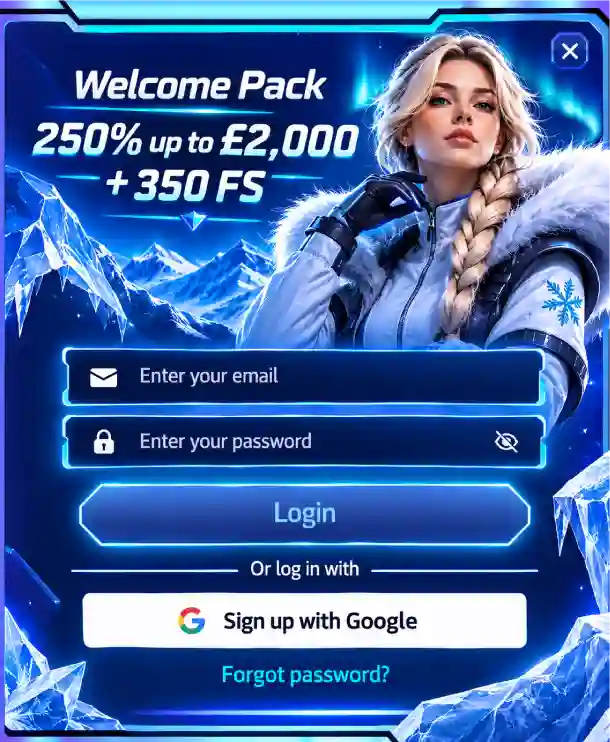
The displayed form also includes a Sign up with Google button. This should be regarded as an available interface option rather than a guarantee that any Google address is automatically linked to an existing account. If you registered using the standard method, use your original login credentials first. Signing in from a mobile follows a similar process: open the website in an up-to-date browser, tap the email field, enter your password and check whether authentication was successful.
- Bookmark the correct login address so you can return to your account quickly.
- Check your keyboard language and whether Caps Lock is enabled if your password is rejected.
- Log out after using a shared computer.
- On your smartphone, use a secure connection and an updated browser.
How to Regain Access Without Registering Again
If you lose your password, there is no need to create another account. At Bet Arctica Casino, the Forgot password? link appears beneath the login form. It starts the recovery process, which normally uses the email address associated with your profile. The next steps depend on the instructions provided by the platform and may involve an email containing a recovery link or another verification method. Your new password should be different from the previous one.
- Select Forgot password? beneath the Login button and enter the email address used when creating your account.
- Check your inbox and spam folder. Only open messages that genuinely relate to your recovery request.
- Follow the recovery instructions, create a new password and sign in again using your updated credentials.
Your Personal Dashboard for Everyday Account Management
Once you have signed in, Bet Arctica Casino allows you to manage your personal account without repeatedly entering registration details. You can check your balance, the status of financial requests, transaction history and any available rewards. Tab names may vary depending on the interface version, so look for Account, Profile, Cashier or similar menu options. Personal limits help you establish a suitable budget and decide how much time you wish to spend using the platform.
| Account Section | Practical Action |
|---|---|
| Personal details | Check your email address, country and contact information |
| Balance | Check the available amount and displayed account currency |
| History | Find the date, amount and current status of a transaction |
| Rewards | Review personal rewards and their current status |
| Limits | Configure available restrictions and reminders |
| Security | Update your password and review account access settings |
Identity Verification Without Unnecessary Confusion
Verification is used to match registration information against the account holder's documents. At Bet Arctica Casino, preparing for KYC begins with checking that your name, date of birth and address have been entered correctly in your profile. Depending on the platform's requirements, you may need to provide identification, proof of address or evidence that you own the payment method. The exact documents and upload procedure are determined by the verification form rather than by general guidance.
- Prepare clear images of your documents with all required details legible.
- Compare your personal information with your registration form before uploading anything.
- Only submit files through the secure section specified by the platform.
- Monitor your verification status in your account and respond to specific requests for additional information.
Mobile Account Access and Personal Data Management
Bet Arctica Casino can be accessed through a mobile browser without changing your existing account. When registering from a smartphone, it is best to open the form first and then move between the fields. Check any automatically completed information manually, particularly your country and email address. After signing in, personal settings can be accessed through the account menu. If interface elements are difficult to view, refresh the page or adjust your browser's zoom settings.
- Open the website on your smartphone, select Sign Up and carefully enter your contact details.
- Once registration has been confirmed, sign in and locate your account settings.
- Check your email address, account currency, available personal limits and whether your transaction history is displayed correctly.
| Situation | First Recommended Step |
|---|---|
| Unable to sign in | Check your email address, keyboard layout and password |
| Forgotten password | Use Forgot password? |
| Recovery email not received | Check your spam folder and confirm the email address is correct |
| Identity verification required | Open the KYC request and prepare the specified documents |
| Personal information needs updating | Review your account settings or contact customer support |
Returning to Your Account with Confidence
To keep BetArctica Casino Login straightforward for everyday use, it helps to maintain access to your registered email address, use a unique password and ensure your profile contains accurate information. At Bet Arctica Casino, the most practical steps after registration are to check your contact details, review your verification status, establish comfortable personal limits and confirm that account recovery is linked to an active email inbox. Once everything is ready, you can move on to managing your personal dashboard.
FAQ
How do I register at BetArctica Casino?
Select Sign Up, enter your email address, create a password and complete the required registration fields. Choose your country of residence and account currency, read the terms and conditions, and confirm your registration. If the system sends an activation email, follow the link provided.
How can I log in to BetArctica Casino from my phone?
Open the website in your Android or iPhone browser, select Login and enter your registered email address and password. Once signed in, you can view your balance, personal settings and transaction history without creating a separate mobile account.
What should I do if I forget my BetArctica password?
On the login page, select Forgot password?, enter the email address linked to your account and follow the recovery instructions. If the message does not arrive, check your spam folder and make sure the address is correct. Once you have created a new password, sign in again.
Which documents are required for account verification?
You may need to provide a passport or another form of identification, proof of your residential address and evidence that you own the payment method. The details must match your registration information. The exact list of required documents is displayed during the KYC process.
Can I change my email address or personal details after registration?
First, check the available options in the Profile or Account Settings section. If the relevant field cannot be edited, contact customer support. Changing your email address or personal information may require additional identity verification.
How can I keep my BetArctica Casino account secure?
Use a unique password, never share your login credentials and only access the website through a verified address. After using a shared device, end your session by selecting Logout. Regularly review your account settings and enable additional security features if available.